Color wheel
Drag the handle to pick a hue, then read its complementary, split-complementary, analogous, triadic, tetradic and square colors. Switch between the artist, digital and perceptual wheels to see why they disagree.
Drag the handle. Around the wheel changes the hue and toward the edge adds color. With the handle focused, use the arrow keys (Shift for bigger steps).
What is a color wheel?
A color wheel arranges hues around a circle so that the relationships between colors show up as angles. Colors opposite each other are complementary, and colors next to each other are analogous. This page has three wheels because the same circle can be built three ways, and they disagree about where each color goes.
Primary, secondary and tertiary colors
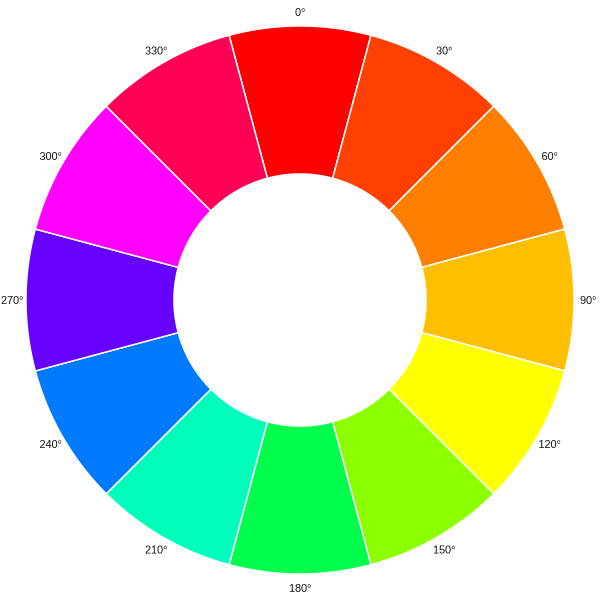
On the artist wheel the primaries are red, yellow and blue, spaced 120° apart. The secondaries (orange, green and violet) sit halfway between two primaries. The six tertiary colors sit between a primary and a secondary. The twelve segments above, in order from the top: Red #FF0000, Red-orange #FF4000, Orange #FF8000, Yellow-orange #FFBF00, Yellow #FFFF00, Yellow-green #8CFF00, Green #00FF4D, Blue-green #00FFBB, Blue #007BFF, Blue-violet #6600FF, Violet #FF00FF, Red-violet #FF0055.
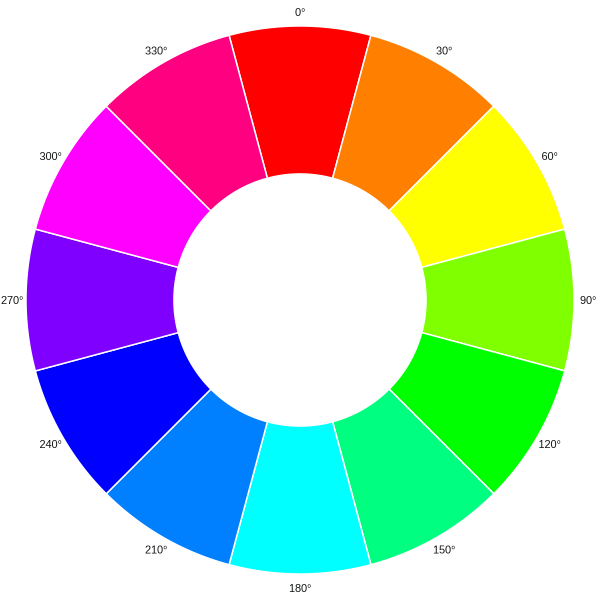
On the digital wheel the primaries are the colors a screen mixes: red, green and blue. Their secondaries are yellow, cyan and magenta.
What are complementary colors?
Complementary colors are 180° apart on the wheel. Because the wheels place hues differently, the same color has a different complement on each one.
| Color | Artist (RYB) | Digital (RGB) | Perceptual (OKLCH) |
|---|---|---|---|
Red #FF0000 | #00FF4D | #00FFFF | #009AAC |
Orange #FF8000 | #0079FF | #007FFF | #00B7F7 |
Yellow #FFFF00 | #FF00FF | #0000FF | #F4F3FF |
Green #00FF00 | #FF0017 | #FF00FF | #F7BAFF |
Blue #0000FF | #FFA500 | #FFFF00 | #6E5000 |
Your orange-red #00FF49 | #FF0001 | #FF00B6 | #FCB9FF |
The perceptual wheel keeps the color's lightness and chroma and turns only the hue. Some opposites, such as the one for pure yellow, fall outside what a screen can show, so they come back paler. See how to use OKLCH in CSS for why that space is useful.
Why do RYB and RGB wheels disagree?
RGB describes light. A screen starts dark and adds red, green and blue light, so the three primaries sit 120° apart and the complement of red is cyan. RYB describes paint. A painter starts with white and subtracts light with pigment, and the tradition of red, yellow and blue as primaries puts green opposite red.
The artist wheel here uses the paint-inspired RYB cube from Gossett and Chen (2004), "Paint Inspired Color Mixing and Compositing for Visualization". The paper gives each corner of an RYB cube an RGB value and interpolates between them. We use that cube to find where each artist angle falls on the screen's hue scale, then keep your saturation and lightness. The result moves hues to the spacing painters expect and leaves brightness alone.
The six color harmonies
A harmony is a set of hues at fixed angles from a base color. Each is a rotation in the model you picked, so the same harmony gives different colors on each wheel.
| Harmony | Hue steps from the base | Colors | Good for |
|---|---|---|---|
| Complementary | 180° | 2 | Strong contrast between two areas, such as a button on a background |
| Split-complementary | 150° and 210° | 3 | Contrast with less tension than a straight complement |
| Analogous | −30° and +30° | 3 | Calm schemes where the colors sit next to each other |
| Triadic | 120° and 240° | 3 | Lively schemes with balanced variety |
| Tetradic | 60°, 180° and 240° | 4 | Rich schemes that need one dominant color |
| Square | 90°, 180° and 270° | 4 | Four evenly spaced colors |
Which wheel should I use?
Use the artist wheel when you work with paint, print or traditional color theory. Use the digital wheel when you write hsl() values in CSS. Use the perceptual wheel when you want colors that look equally light and equally vivid, which the digital wheel does not give you: its yellows look far lighter than its blues at the same lightness setting.
Printable color wheel
Download a ready-made twelve-color wheel for the artist or the digital model, as vector SVG or as a PDF sized for one page. They are free and need no login. To print the wheel with your own base color and harmony, use Print this wheel above.
Frequently asked questions
What is the difference between an artist color wheel and an RGB color wheel?
They place the same hues at different angles. The artist wheel follows the paint tradition with red, yellow and blue as primaries, so red sits opposite green. The RGB wheel follows how screens mix light with red, green and blue as primaries, so red sits opposite cyan.
What colors are opposite each other on the color wheel?
On the artist wheel the classic pairs are red and green, yellow and violet, and blue and orange. On the digital wheel they are red and cyan, yellow and blue, and green and magenta. The table above lists more, for all three wheels.
How many colors are on a color wheel?
The traditional wheel shows twelve: three primary, three secondary and six tertiary colors. The wheel on this page works at every one of its 360 angles, so you can read the harmony for any hue.
Is the artist wheel accurate for mixing real paint?
It is a model, not a measurement. Real paints change with pigment, binder and thickness, so two reds can mix differently. Use the wheel to plan relationships between colors and test the mix on your own paints.
Can I print the color wheel?
Yes. Use Print this wheel for the wheel you have set up, or download a ready-made twelve-color wheel as an SVG or PDF from the printable section. Both fit one A4 or Letter page and need no account.
Keep going
Move your colors into the other tools.
Content updated